Skip to content

AI & automation in Brisbane

AI with a specific job to do.

We build AI into a defined workflow: answering questions from your documents, drafting structured content or moving information between systems. Each use has a clear job, a way to measure it and limits around it. Our own product, Kova, is built exactly this way.

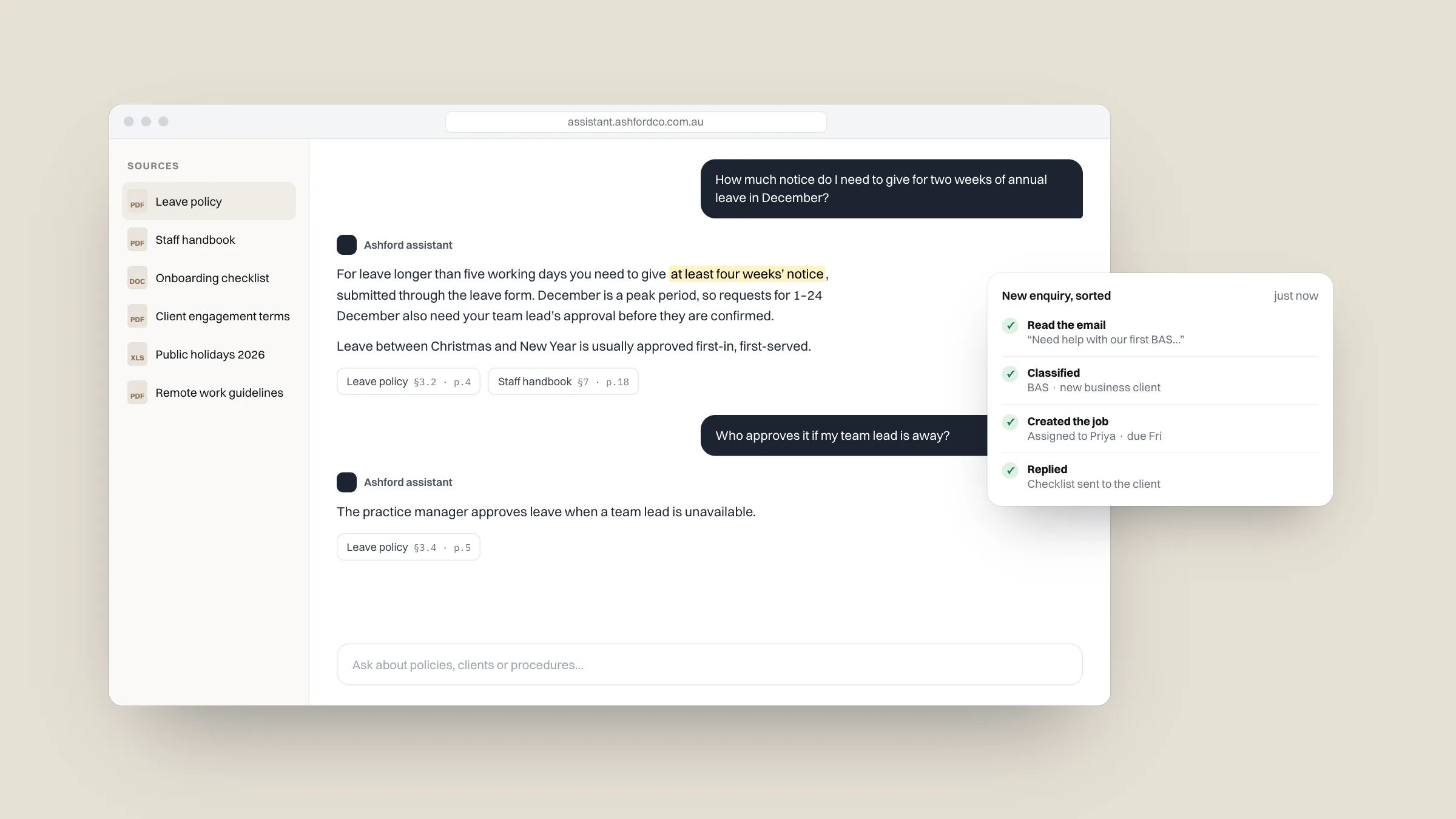
Example staff AI assistant answering a leave question from the company policy, with the source shown

AI & automation

What’s included

  1. 01

    AI assistants

    Assistants for customers or staff that answer from your own content, hand over to a person when they should and stay within the topics you set.

    Customer assistants · Staff assistants · Human handover

    Learn more
  2. 02

    Document search & retrieval

    Ask questions across policies, manuals, contracts or knowledge bases and get answers that cite the source document.

    Retrieval · Source citations · Knowledge bases

    Learn more
  3. 03

    Workflow automation

    Remove repetitive steps: sorting enquiries, pulling details out of emails and forms, and updating the systems that need them.

    Enquiry triage · Data extraction · System updates

    Learn more
  4. 04

    LLM integration

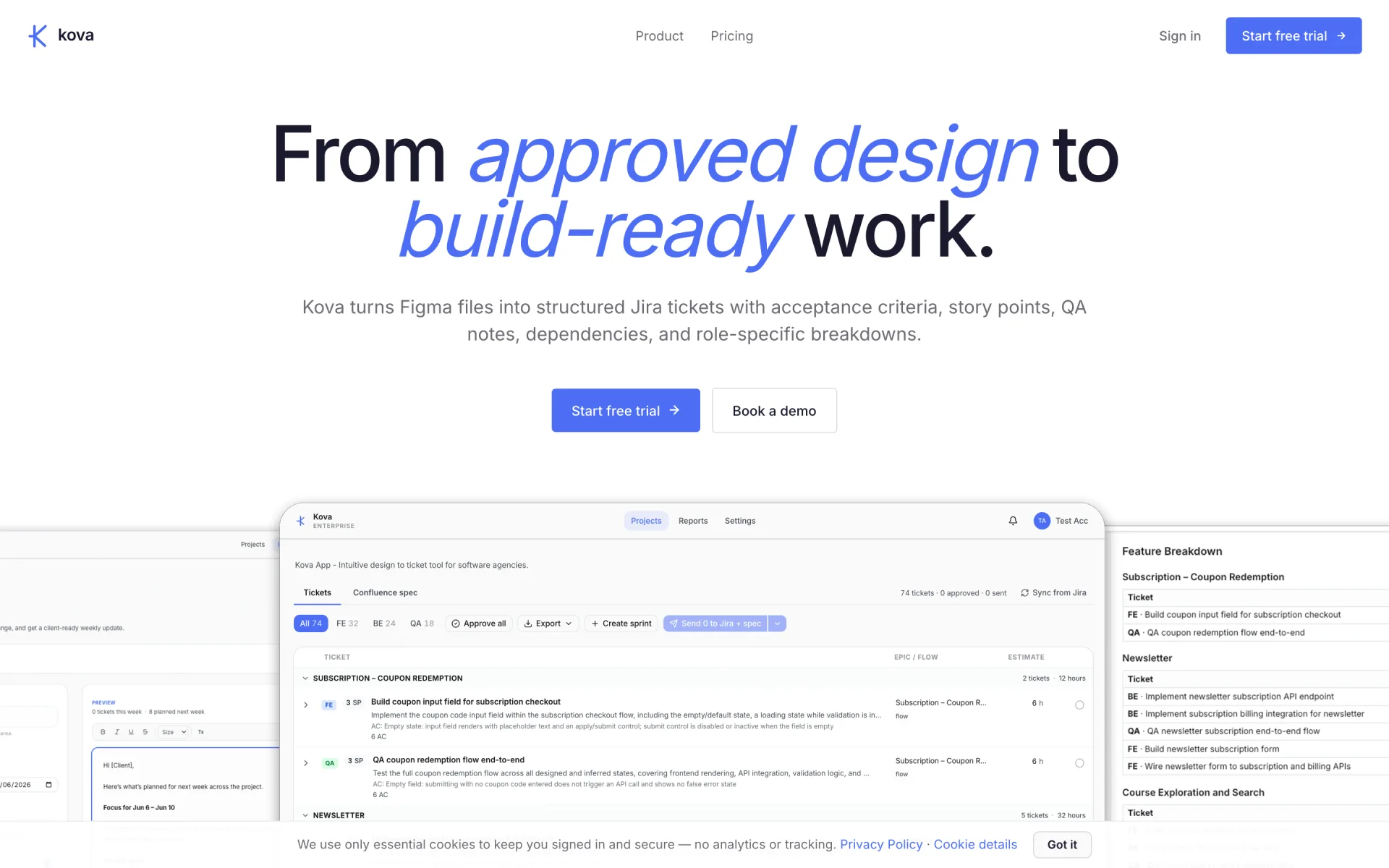
    Language models added to an existing product or internal tool. Kova, for example, reads Figma designs and writes structured Jira tickets and Confluence specifications.

    Existing products · Structured output · Model selection

    Learn more
  5. 05

    Evaluation & guardrails

    Test sets, output checks and usage limits, so you know how accurate the AI is before it reaches customers, and that it stays accurate after changes.

    Evaluation sets · Output checks · Usage limits

    Learn more

Signs AI or automation would pay off

  • Your team answers the same questions every day

    Hours, prices, what’s included, how long it takes. An assistant restricted to your own information can handle these around the clock.

  • Details get copied from emails into other systems

    New enquiries, orders or bookings re-typed by hand. Automation can pull the details out and put them where they belong.

  • Staff hunt through documents for answers

    Policies, manuals, contracts and past projects. Document search answers the question and shows where the answer came from.

  • Enquiries wait until someone is free

    An automation can sort, route and draft a first reply within minutes, even after hours.

  • You tried a chatbot and it made things up

    The fix is restricting it to approved content, testing it properly and handing over to a person when it should.

  • You’re paying for AI tools nobody uses

    Often the problem is that the tool was bought before the job was defined. We start with the job.

Is AI & automation right for you?

A good fit if

  • A specific task repeats daily or weekly and takes real time
  • You have the information the AI should answer from
  • You want it tested for accuracy before customers see it
  • You want people kept in the loop where it matters
  • You want the running costs known before you commit

Probably not the right fit if

  • You want AI to make decisions about people, money or legal matters on its own. We will not build that
  • The task happens a few times a month. It won’t pay back the setup
  • There is no reliable source of truth for it to answer from yet

Off-the-shelf AI tools or a custom build?

General AI subscriptionOff-the-shelf chatbot or AI toolCustom assistant or automation
Typical cost$30–$50 per person a month$50–$500 a monthA fixed quote to build, plus usage
Answers from your informationOnly what you paste inPartly, within the tool’s limitsYes, and only from it
Connects to your systemsNoSomeYes
Tested for accuracyNoRarelyYes, before launch and after changes
Data handlingDepends on the planVendor’s termsChosen to suit your data
Best forDrafting and research by staffStandard use casesSpecific, repeated jobs in your business

What you get

What you have at handover.

  • A defined use case with success measures
  • The AI feature, live inside the workflow
  • An evaluation set and guardrails
  • Code, prompts and documentation handed over

You own it.

The code and intellectual property transfer to you on final payment, into your own repository.

Documented.

Every build is handed over with documentation, so your team or another developer can maintain it.

Supported in writing.

A written agreement defines what we maintain after launch and the response times you can expect.

How it runs

How an AI & automation project runs

Fixed scope and price before work starts, working results to review at every stage, and one team from first call to launch.

  1. Week 1

    Define the job

    We pick one task, measure how long it takes today, gather real past examples and agree what a good result looks like.

  2. Weeks 2–3

    Build and connect

    The automation or assistant built on your content and connected to your tools, with guardrails, usage limits and a hand-over to a person.

  3. Week 3–5

    Test on real examples

    Tested against 20 past examples for automations, or 50 real questions for assistants. You see the accuracy results before anything goes live.

  4. Week 4–6

    Launch and tune

    Live with a person reviewing the output at first, then 30 days of tuning as real use shows what to improve.

Packages

What you get

Every project is priced on its scope, with a fixed quote after a free 30-minute call, before any work starts.

Automation

Fixed quoteUsually 2–3 weeks

Included

  • One automated workflow, such as enquiry to CRM with a drafted reply
  • Connected to up to two of your existing tools
  • Tested on 20 real past examples before going live
  • Alerts if anything fails, so nothing goes missing
  • Written instructions and 30 days of tuning

Not included

  • Tool subscriptions and AI usage (usually $10–$100 a month)
  • A custom screen or app
  • More than two connected systems
Add-ons
  • Extra connected system

AI assistant

Fixed quoteUsually 4–6 weeks

Included

  • For customers on your website, or for staff
  • Answers only from your own content (up to about 50 documents or pages)
  • Hands over to a person when it should
  • Stays on the topics you set, and says so when it does not know
  • An accuracy test of 50 real questions, shared with you before launch
  • A monthly usage cap, a way to update its information, and 30 days of tuning

Not included

  • AI usage (usually $20–$200 a month, estimated upfront)
  • Bookings or CRM connection (available as an add-on)
  • Phone or voice assistants
  • Other languages
Add-ons
  • Connect to bookings or CRM
  • Extra content beyond about 50 documents

Book a free 30-minute callOr send us the details

What moves the price

  • How many systems it touches

    Each connected tool adds setup, testing and failure handling.

  • How much content it answers from

    A few pages is quick. Hundreds of documents need structuring and more testing.

  • Who sees the output

    Drafts for staff to check cost less to make safe than answers that go straight to customers.

  • Volume

    Usage costs grow with use. We estimate them up front and set a monthly cap.

Example: Kova

From a Figma frame to a Jira ticket

Kova is our own product. It reads a design and writes structured Jira tickets and Confluence specifications from it, the kind of narrow, well-defined job where AI saves real hours and its output can be checked before anyone relies on it.

Read the case study

Related work

Built and in production.

Questions about AI & automation

View all articles

Free guide

Is your website quietly losing you enquiries?

A free guide to the seven reasons small business websites don't bring in work, with a two-minute check and a practical fix for each. What's inside

We'll only use your email to send the guide and these tips. See our privacy policy.

Questions

Frequently asked questions

How much does it cost?

AI work is priced on its scope: how many systems it connects to, how much content it answers from and who sees the output. AI usage is a separate running cost, which we estimate before you commit and cap each month. You get a fixed quote after a free 30-minute call, before any work starts.

How long does it take?

Automation: usually 2–3 weeks; AI assistant: usually 4–6 weeks. We confirm the timeline with the quote, before any work starts.

Where does AI actually help a business?

Most of the value is in narrow, repetitive work: answering common questions, sorting and summarising enquiries, drafting documents from a template and pulling details out of emails and forms.

How do you know the AI gives correct answers?

Each build includes a test set of real questions or past examples with known answers. We measure against it before launch and again after every significant change, and share the results with you.

What happens to our data?

We choose providers and settings to suit the data involved, limit what the model can access and keep sensitive information out where it is not needed. See our article on the risks of using AI in business.

What are the ongoing costs?

Usage costs from the AI provider, usually $10–$100 a month for an automation and $20–$200 for an assistant at small-business volumes. We estimate them before you commit and set a monthly cap.

Can you add AI to software we already have?

Yes. Most products can take an AI feature through their API or database, without being rebuilt.

Will it replace staff?

That is rarely the result. It removes the repetitive part of a job so people spend their time on the work that needs them.

More services

The rest of the build.

Enquire

Talk to us about AI & automation.

Tell us what you are working on and what you need. An outline is enough to start. We reply within one business day.

Prefer email? hello@vareonhq.com